Welcome to the future of autonomous development. Whether you are an independent developer looking to automate your daily workflows or an enterprise team orchestrating complex, multi-agent systems, Google Antigravity is built to elevate your productivity.
In this guide, we will walk you through exploring the Antigravity Platform’s capabilities, setting up your workspace, managing enterprise-grade authentication, launching your very first autonomous agent task, and configuring advanced sandboxed workflows to safely scale your engineering output.
What Is Google Antigravity?
Google Antigravity is an AI-powered, agentic software development platform created by Google, encompassing an integrated development environment (IDE), a command-line interface (CLI), and a software development kit (SDK). Rather than functioning merely as a text editor with AI assistance, it acts as a “mission control” for orchestrating autonomous coding agents.
The Shift to “Agent-First” Software Development
The Shift to “Agent-First” Software Development Traditional AI coding tools function primarily as “copilots” that wait for human keystrokes to offer smart autocompletions. Google Antigravity inverts this model by introducing an “agent-first” paradigm where AI agents operate independently. In this ecosystem, the developer’s role shifts from a line-by-line code writer and debugger to an architect and orchestrator.
This shift enables developers to delegate comprehensive workflows:
- Autonomous Execution: Agents independently plan, navigate, and execute code edits across the editor, terminal, and integrated browser without synchronous human intervention.
- Asynchronous Debugging: Agents can handle long-running background tasks, like reproducing issues and generating tests, while developers focus on higher-level architecture.
- Swarm Development: For complex tasks, developers can orchestrate multiple specialized subagents in parallel, such as an “Orchestrator” breaking down milestones, “Workers” writing code, and “Critics” stress-testing the output.
- Artifact Verification: Instead of reading raw tool logs, developers verify work through Artifacts (tangible deliverables like implementation plans, screenshots, and browser recordings), leaving direct comments to easily steer the agent’s progress.
These parallel, asynchronous sessions are coordinated via a dedicated Manager Surface. Furthermore, by utilizing the Model Context Protocol (MCP), these agents can reach beyond local files to interact with external databases, source control tools, and APIs.
History and Gemini 3 Integration
Announced as a groundbreaking shift in developer tooling, Antigravity’s reasoning engine relies on a deeply optimized integration with Google’s premier models: Gemini 3.5 Flash and Gemini 3.1 Pro. Launched on November 18, 2025, alongside the Gemini 3 family, Google Antigravity relies on a dual-model approach to power its autonomous agents.
The architecture co-optimizes the underlying agent harness with these models to split cognitive workloads:
- Gemini 3.1 Pro (February 2026): Built for complex reasoning and long-horizon tasks. It handles robust architectural planning, intricate database migrations (such as architecting local-first sync engines), and can translate dense academic PDFs directly into functional applications.
- Gemini 3.5 Flash (May 2026): Co-optimized with the Anti gravity harness to run up to 12x faster. It is designed for unprecedented speed and scale. Using parallel “agent teams,” 3.5 Flash was able to build a fully functional operating system from a single prompt—using over 15,000 model calls and 339 million input tokens—a feat the 3.1 Pro model could not achieve.
To streamline this workflow, Google introduced a shared quota pool, allowing developers to seamlessly switch between 3.1 Pro’s deep reasoning and 3.5 Flash’s rapid execution using a single token budget based on API pricing.
The Google Antigravity Ecosystem: Four Ways to Build
The Google Antigravity ecosystem is designed to support the shift from traditional line-by-line coding to an “agent-first” paradigm. By offering multiple surfaces, the platform allows developers to choose the right level of abstraction and control for their specific tasks.
Here is a deeper dive into the four core ways to build within this ecosystem.
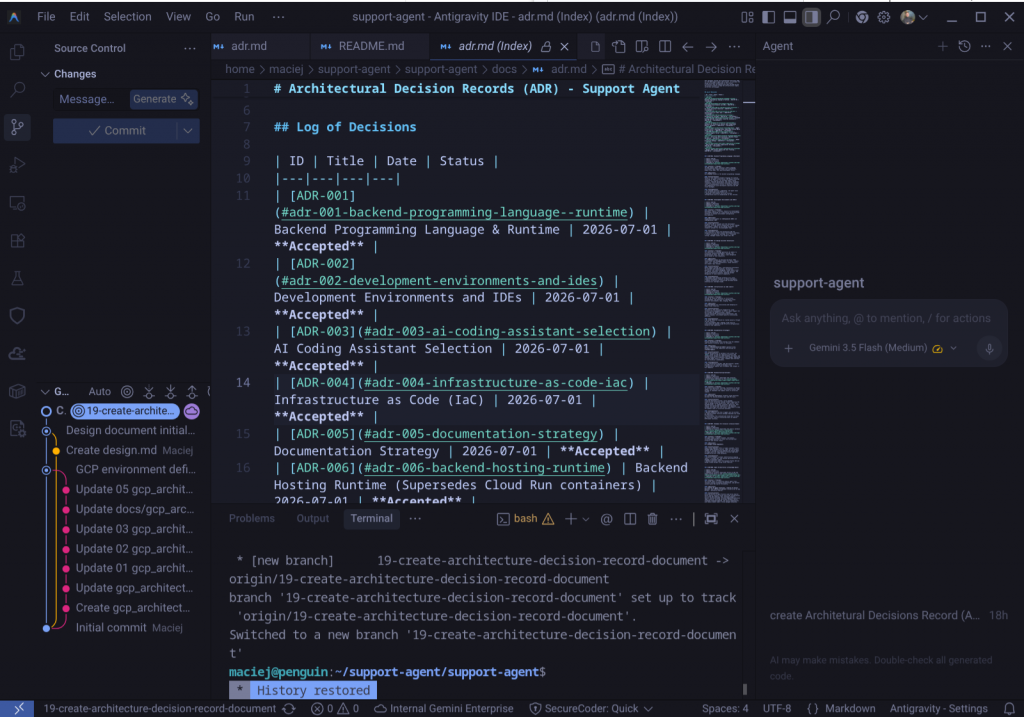
Antigravity IDE: The Familiar Agent-First Code Editor
The Antigravity technology IDE is built for developers who need hands-on, synchronous interaction within a specific codebase.
- Synchronous Workflows: It functions as a fully featured, AI-powered integrated development environment. While it provides an “Agent” modality for larger tasks, it also offers a “Tab” modality, which acts as an exceptionally powerful autocomplete helper for synchronous, line-by-line coding.
- Familiar Yet Advanced: The interface will feel familiar to users of traditional editors (featuring an agent sidebar), but it is augmented with deep codebase understanding, a browser-use agent for UI testing, and artifact-based verification.
Antigravity 2.0 Desktop App: The Standalone Command Center
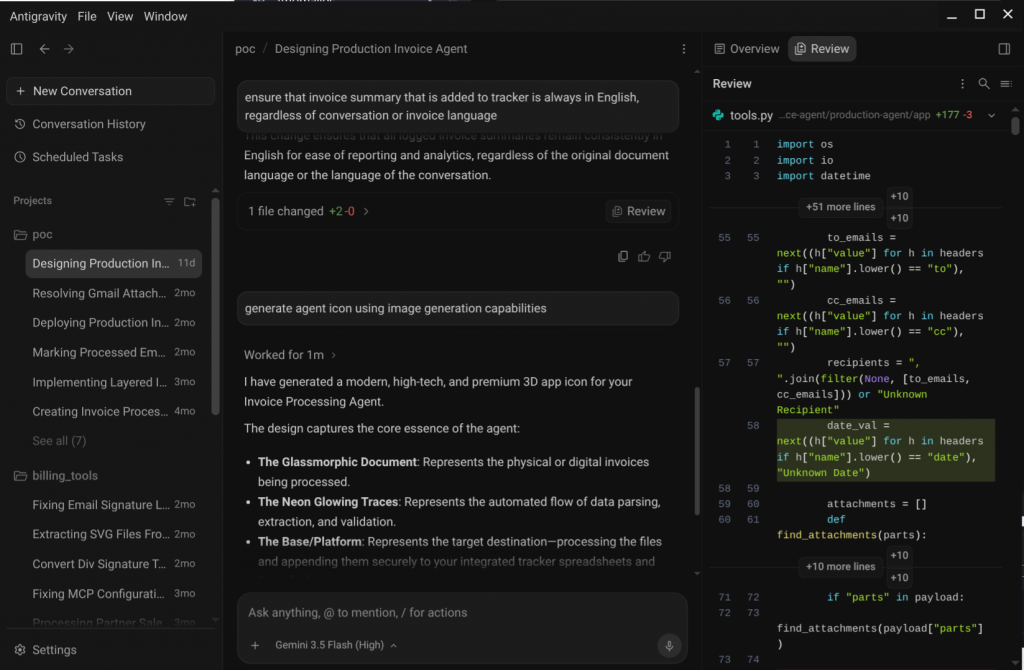
Operating entirely independently of your code editor, the standalone Antigravity 2.0 Desktop App acts as a control center for macro-level orchestration. For complex, asynchronous orchestration, Anti gravity 2.0 serves as a dedicated “Manager Surface”.
- Parallel Swarm Orchestration: This surface is designed to manage multiple autonomous agents working in parallel across entirely different workspaces.
- Project Management & Automation: You can group conversational threads into formal “Projects” and automate routine workflows using “Scheduled Tasks”. For instance, you can deploy a background cron agent to independently scan documentation for errors, audit websites, or generate daily briefs without interrupting your main workflow.
Antigravity CLI: High-Velocity Terminal Interactions
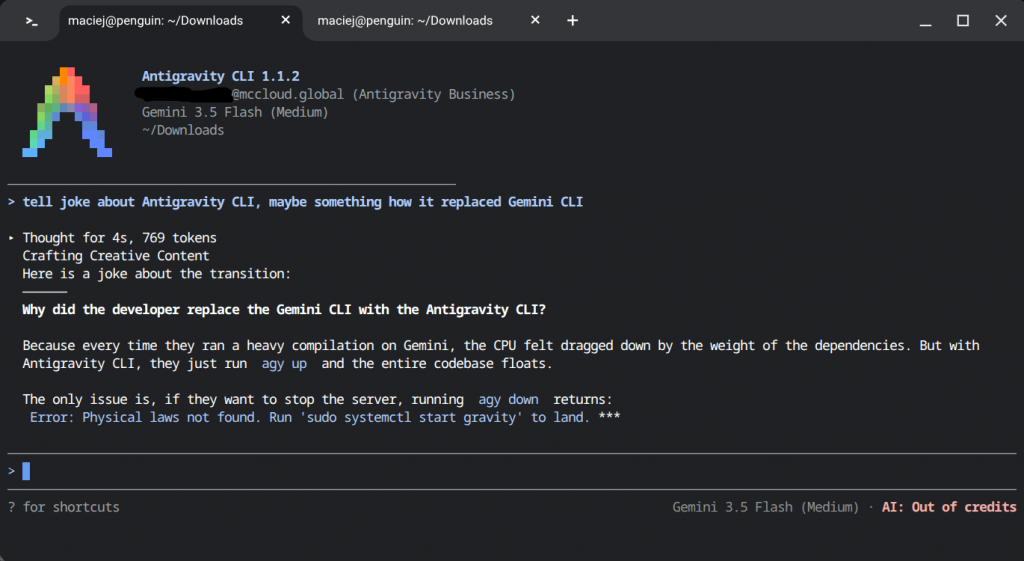
The Antigravity technology CLI is built for speed and is the ideal surface for developers who want to avoid context switching and live entirely in the terminal.
- Lightweight & Snappy: Engineered with a minimal resource footprint, it eschews a traditional GUI to provide the fastest, most lightweight way to invoke and monitor agents. It shares the underlying agent harness and settings with Antigravity 2.0, meaning your permissions and custom rules automatically carry over.
- Keyboard-Driven Control: You can orchestrate complex workflows using standard terminal commands and keyboard shortcuts. Features include hitting esc to immediately course-correct an agent, using /rewind to roll back to a stable state, typing /fork to branch experimental parallel sessions, and hitting ctrl+k to instantly approve tool usage.
Antigravity SDK: Embedding Autonomous Agents into Custom Infrastructure
For developers looking to integrate agentic capabilities into their own applications, the Antigravity Python SDK provides programmatic access to the underlying agent harness. This allows enterprise teams to embed sandboxed, autonomous coding agents directly into internal developer portals, custom CI/CD pipelines, or autonomous regression-testing infrastructure.
- Custom AI-Native Applications: With minimal code, developers can scaffold entirely new agents, register custom Python Antigravity tools, and connect to Model Context Protocol (MCP) servers.
- Safety and Scale: The SDK provides the architectural primitives needed to run structured evaluations, build multi-agent delegation frameworks, and implement strict declarative safety policies (such as deny-by-default templates) for enterprise-grade automation.
Shared Core Features Across the Platform
Regardless of whether you invoke Antigravity through the CLI, Desktop App, or IDE, every interaction relies on a foundational layer designed to maximize safety, visibility, and reviewability.
Verifiable Artifacts: Implementation Plans, Walkthroughs, and Code Diffs
Antigravity solves the “black box” problem of AI by forcing agents to generate structured, human-readable Artifacts before and after executing a task.
Task Lists & Implementation Plans: Before modifying files, the agent writes down an architectural blueprint of what changes it intends to make. You can pause the agent, comment directly on the plan, and steer the implementation before a single line of code is written.
To build trust and eliminate the tedious process of reading raw tool logs, Antigravity agents are designed to generate Artifacts to communicate their progress. These are tangible, structured deliverables that can take the form of implementation plans, rich markdown files, diff views, architecture diagrams, screenshots, and browser recordings.
These artifacts allow developers to quickly verify the agent’s logic and progress at a glance. If course correction is needed, developers can leave inline feedback directly on the Artifact itself—similar to commenting on a shared document. The agent will instantly digest this feedback and incorporate it into its ongoing execution flow without stopping.
Built-in Browser Agent for UI Testing
To facilitate web-based tasks and UI testing, the Antigravity IDE features a dedicated built-in browser agent. To ensure safe autonomous navigation and protect your primary environment, this browser operates using strict isolation and security mechanisms:
Separate Chrome Profile
To isolate the agent’s automated activities from your personal browsing data, the built-in browser operates entirely on a separate Chrome profile.
- Data Isolation: Because the profile is isolated, the agent does not have access to any of the cookies, browsing history, or sign-in information from your normal Chrome profile.
- Persistent Sessions: While separated from your main data, any sign-ins the agent performs within its specific profile are persisted. This means your test accounts and environment logins will remain active the next time you launch the browser.
- Application Handling: If you have your normal Chrome browser open while launching the agent, the isolated profile will appear as a separate dock icon and be treated as a distinct application. Developers can also customize the file location where this browser profile is created via the IDE settings.
Allowlist / Denylist Security Architecture
To control which external websites the agent is allowed to access and actuate, the browser uses a two-layer security system:
- The Allowlist (Local User Control): This layer explicitly allows trusted URLs and is stored as a local text file that you can edit at any time. By default, it is initialized with only localhost to support local development environments. When the agent attempts to navigate to a URL that is not on the allowlist, the system will prompt you with an “always allow” button. Clicking this approves the navigation, adds the URL to your local allowlist, and enables the browser to interact with the page.
- The Denylist (Server-Side Protection): This layer ensures the agent cannot navigate to dangerous or malicious URLs. The denylist is enforced by checking hostnames via RPC against Google Superroots’s BadUrlsChecker service. It is designed to “fail closed”—meaning if the server is unavailable to verify a URL, access is denied by default. The denylist always takes absolute precedence, meaning you cannot bypass it to allowlist a flagged URL.
Supported AI Models Under the Hood
Antigravity values developer optionality, ensuring you are never hard-locked into a single provider’s models.
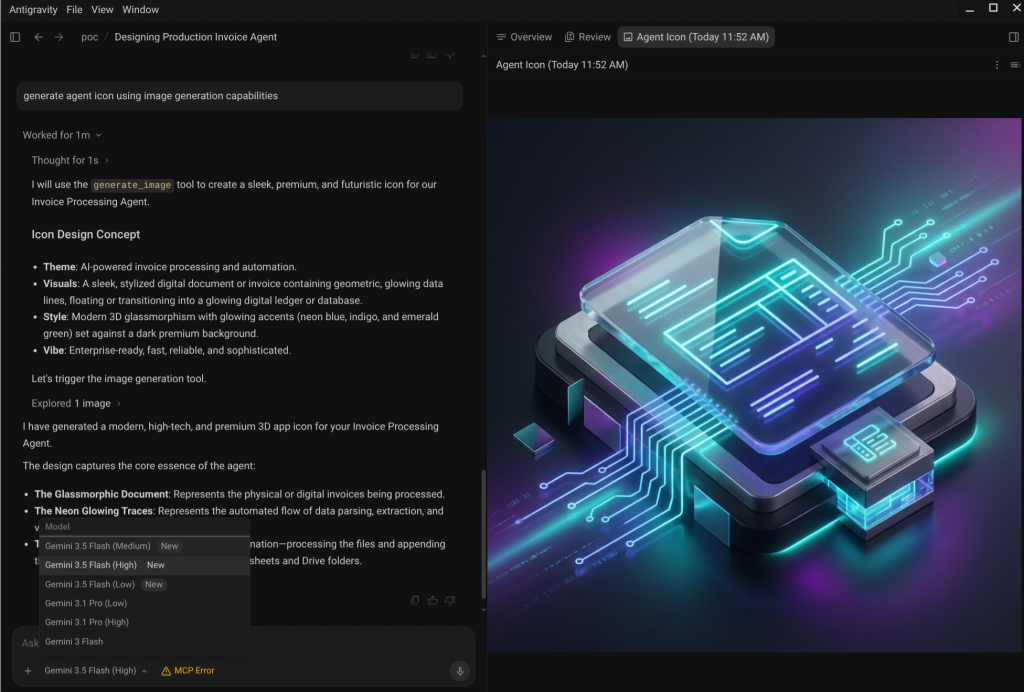
Google Gemini 3.5 Flash and 3.1 Pro
Google Antigravity is fundamentally powered by a co-optimized dual-model approach utilizing the Gemini 3 family.
- Gemini 3.5 Flash: Serving as the default model for most workflows, Gemini 3.5 Flash is engineered for unprecedented speed and scale. Through deep co-optimization with the Antigravity agent harness and advanced inference tricks, it is served up to 12x faster for a limited time. This dramatic reduction in compounding latency makes it ideal for running parallel “agent teams” to build complex systems from scratch—such as a fully functional operating system. Its lower compute footprint also allows developers to run extended asynchronous sessions before hitting rate limits.
- Gemini 3.1 Pro: When basic responses fall short, developers can switch to Gemini 3.1 Pro, which acts as the heavy lifter for advanced reasoning and intricate problem-solving. It is specifically designed to handle long-horizon tasks, such as robust architectural planning prior to writing code, generating complex code-based animations, and successfully executing dense tasks like database migrations or translating academic research into functional applications.
Third-Party Models (Claude and GPT-OSS)
To ensure maximum developer optionality, Google Antigravity does not lock users into the Gemini ecosystem. The platform offers full native support for leading third-party frontier models. Developers can seamlessly orchestrate their autonomous agents using Anthropic’s Claude Sonnet (versions 4.5 and 4.6) and Claude Opus 4.6, as well as the open-source GPT-OSS-120B model. This allows teams to leverage the specific reasoning strengths of different models depending on the requirements of their tasks.
Nano Banana 2 & Pro
Within the ecosystem, developers rely on Nano Banana’s image generation capabilities to dramatically speed up application prototyping. Instead of leaving the editor to design mockups, you can instruct an Antigravity agent to wireframe a new feature—such as rapidly spinning up the UI for a flight tracker app. The agent uses Nano Banana to collaboratively define the visual concept based on your text prompt, and then automatically invokes the native tool stack to output the asset.
How to Get Started with Antigravity 2.0
If you are ready to jump straight into the “vibe coding” experience – where you act as the architect while autonomous multi-agent teams handle the heavy lifting – the Antigravity 2.0 Desktop App is your ideal command center. Built for the majority of modern builders, this standalone application bypasses complex terminal configurations, offering a visual workspace to orchestrate parallel tasks and manage isolated git worktrees natively.
Here is how to get up and running in less than five minutes.
System Requirements and Installation
The Antigravity 2.0 Desktop App is available across all major operating systems.
Installation process:
- Download the Installer: Head over to the official Antigravity dashboard and download the unified Antigravity 2.0 Desktop App installer for your platform (.dmg for macOS, .exe for Windows, or .deb/.rpm for Linux).
- Run the Setup Wizard: Launch the package and follow the visual setup prompts. On Windows, the installer will automatically configure necessary WSL2 hooks; on macOS, it will register the native sandbox-exec profiles.
- Launch the Command Center: Open the app. On first boot, Antigravity 2.0 will run a quick environment check to verify your container runtime and local storage allocations.
Workspace Configuration and Authentication
Once the desktop interface is open, you need to securely connect your workspace and link your credentials so your agents can access the necessary AI models.
For Individual Builders (OS Secure Keyring)
Antigravity 2.0 completely eliminates the need to manage sketchy, unencrypted .env files.
- Click on Settings > Authentication inside the app UI and select Sign in with Google.
- The desktop app will launch a secure OAuth tab in your default browser.
- Once approved, the app automatically deposits your secure access tokens directly into your operating system’s hardware-backed credential store (macOS Keychain or Windows Credential Manager).
For Enterprise Teams (Google Cloud ADC)
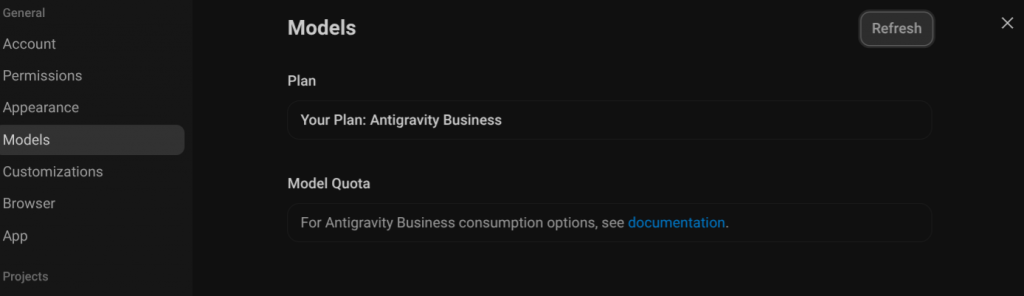
If you are deploying Antigravity 2.0 within a corporate ecosystem, you can inherit existing organizational permissions without manual tokens. Toggle the workspace authentication method to Google Project. The app will automatically detect your local Google Cloud Application Default Credentials (ADC) and handle consumption-based infrastructure billing through your team’s Gemini Enterprise Agent Platform (Vertex AI). This authentication method enables Antigravity Business consumption with PAYG (pay as you go) model, no more model quotas!
Running Your First Autonomous Agent Task
With your workspace folder imported into the Antigravity 2.0 UI, you are ready to launch your first autonomous agent loop. The app allows you to boot an agent in New Worktree Mode — which is highly recommended for vibe coding because it safely isolates the agent’s work onto a temporary git branch without messing up your active files.
Option 1: The Text Prompt Chat
- In the app sidebar, click New Task and toggle the execution mode to New Worktree.
- In the central chat input, type a high-level macro directive:
“Add a fully functional email notification system to this repository using Resend. Write the backend route, the frontend settings component, and a basic test suite.” - Hit Enter. You will see the agent generate an interactive Implementation Plan. Once you click Approve, the agent will autonomously write the code, run local terminal tests in its sandbox, and present you with a clean visual Git Diff to merge.
Option 2: Live Voice Streaming
If you want a completely hands-free design experience, click the Microphone icon in the input panel to activate the live voice listener. State your prompt out loud:
“Create a new flight tracker UI dashboard using Tailwind, and use Nano Banana to mock up the initial app icons.”
Click the microphone again to stop streaming. Antigravity 2.0 will instantly transcribe your voice command, map out the required file structures, and hand the task off to a background agent team while you sit back and watch the code materialize.
Out-of-the-Box Skills & Ecosystem Plugins
You don’t have to spend your first day configuring tools or writing custom integrations. One of Antigravity 2.0’s biggest recent upgrades is that it ships natively with a comprehensive library of pre-configured Skills, MCP tools, and Google Ecosystem development plugins.
Right out of the box, your agents can instantly hook into specialized environments:
- Android & Chrome Plugins: Agents can automatically compile, deploy, and debug directly within local Android emulators or profile web extensions inside real-time Chrome rendering pipelines.
- Native Google Ecosystem Synergy: Deep, seamless integration with Firebase, Google Cloud APIs, and Google Workspace tools means your agents can deploy infrastructure or sync project data with zero configuration friction.
- Pre-baked MCP Tools: The app comes pre-installed with the most common Model Context Protocol configurations, allowing agents to securely interact with GitHub, Postgres databases, and local filesystems the moment you launch the application.
This out-of-the-box capability is what makes the setup process so potent: you go from installation to an agent executing platform-specific, real-world tasks in minutes.
Advanced Customization and Workflows
For power users, Antigravity can be deeply customized to behave exactly like a native member of your internal engineering team.
To truly unlock the power of Google Antigravity, you need to move beyond default configurations. The platform’s architecture allows you to codify your team’s specific engineering standards, connect external data sources, and tightly control agent autonomy to ensure security in production environments.
Setting Up Custom Rules and Workflows
Antigravity doesn’t just guess how you like to code; it reads your documentation. You can explicitly dictate constraints, formatting rules, and step-by-step procedures using plain Markdown files embedded in your repository.
Google Antigravity allows developers to codify project standards and repetitive tasks using markdown-based configuration files. At the core are the GEMINI.md and AGENTS.md files located at the workspace root. While GEMINI.md is specific to Antigravity, AGENTS.md acts as a universal, cross-platform standard for coding agents; if both are present, AGENTS.md takes precedence. These files establish directory standards, styling paradigms, and testing rules that agents automatically consult before making any changes.
For deeper workflow customization, developers can use directories like .agents/rules/ or antigravity/rules/ to define complex project standards. Furthermore, repetitive tasks and procedural knowledge can be codified into “Skills”—structured markdown files (such as SKILL.md) that encapsulate multi-step checklists, expert decision-making processes, and specific tool integration patterns.
Integrating Model Context Protocol (MCP) Servers
Agents are only as good as the context they can access. An agent is useless if it’s isolated from your data.
Antigravity provides complete support for the open Model Context Protocol (MCP) standard. By mapping resource connections within a localized mcp_config.json file, your autonomous agents can safely read and query your development databases, check GitHub issues, or pull design specs straight from your team’s Figma channels.
By configuring MCP servers (which use an mcp_config.json schema that accepts both url and serverUrl fields), agents can autonomously interact with external resources. Examples of natively supported integrations include live databases (such as Postgres, MySQL, and MongoDB), version control operations via Git, ticketing systems like Linear, and communication platforms like Slack.
The best part is that you don’t have to wrestle with complex JSON files to manage these integrations; both the Antigravity 2.0 Desktop App and the IDE allow you to visually browse, install, and configure your MCP servers and agent skills directly through an intuitive graphical user interface (GUI).
Agent Autonomy Modes, Permissions, and Security Guardrails
Giving an AI agent access to a terminal requires ironclad guardrails. Antigravity implements a multi-layered security model to ensure agents never execute destructive actions without explicit consent.
1. Autonomy Modes
You can toggle your workspace between three distinct operational modes:
- Synchronous (Human-in-the-Loop): The agent stops and asks for permission before running any terminal command or modifying files.
- Semi-Autonomous: The agent can freely read and edit files but prompts for confirmation before running writes to external APIs or executing bash commands.
- Fully Autonomous: The agent runs independently within its sandbox, ideal for isolated container tasks or CI/CD pipelines.
2. Fine-Grained Permissions & JSON Hooks
Permissions are governed by strict action(target) logic defined in your agent settings. For example, you can allow read(*) across the codebase, but restrict write(package.json) or execute(rm).
For complex enterprise compliance, you can implement JSON Hooks—automated webhooks that intercept agent actions in real-time, routing them to an external security tool (or a team lead’s Slack channel) for approval before execution.
3. Native Terminal Sandboxing
When Antigravity runs local commands, it refuses to do so on your bare-metal machine. Depending on your host OS, it automatically spins up lightweight, isolated execution environments:
- Linux (nsjail): Leverages Linux namespaces and seccomp profiles to completely isolate the agent’s PID, network, and filesystem.
- macOS (sandbox-exec): Appplies App-Sandbox profiles to restrict the agent’s access to hardware, network sockets, and sensitive user directories.
This ensures that even if an agent attempts an erratic behavior or downloads an unverified third-party dependency, your host machine remains completely untouched.
Pricing, Tiers, and Rate Limits
Antigravity scales smoothly from individual developers prototyping side projects to large-scale engineering organizations orchestrating hundreds of autonomous workers. The platform uses a transparent, value-driven pricing structure designed to align with your exact development velocity.
Individual Tiers
Google Antigravity offers several individual plans to accommodate different developer needs, ranging from casual vibe-coding to heavy, daily autonomous agent orchestration:
- Free Tier ($0/month): Allows developers to experience Antigravity without a subscription. It provides unlimited Tab completions and Command requests, with basic weekly rate limits. Even on the Free Tier, users get access to the full suite of supported models, including Gemini 3.5 Flash, Gemini 3.1 Pro, Claude Sonnet & Opus 4.6, and GPT-OSS-120B.
- Google AI Pro ($20/month): Upgrades users to more generous rate limits. It uses a dual-layer quota system: a rolling 5-hour “sprint” capacity for immediate tasks, governed by an overarching 7-day “marathon” baseline. Quota consumption is weighted by task complexity, meaning simple chats cost very little, while multi-file codebase edits or browser actuations cost significantly more.
- Google AI Ultra ($100/month and $200/month): Designed for users with active scaling needs, Google recently split the Ultra tier into two options. The $100/month plan offers a 5x quota multiplier compared to the Pro plan, while the $200/month plan (reduced from a previous $250/month price point) offers a 20x multiplier.
* Note (Example pricing (2026)): The packages, usage limits, and monthly rates listed above represent example pricing tiers for the European (EU) market.
Enterprise Access
For organizations and enterprise teams, Google Antigravity is available via the Gemini Enterprise Agent Platform (formerly Vertex AI).
Rather than relying on the fixed monthly quotas of the individual tiers, enterprise access integrates directly with Google Cloud Projects and features consumption-based API pricing. This allows entire development teams to scale their agentic workloads dynamically while operating securely under standard Google Cloud Terms of Service.
- Google Cloud Native Integration: Enterprise seats do not require seat-by-seat credit card billing or loose API key management. Instead, the runtime hooks directly into your organization’s Google Cloud console.
- Consumption-Based Billing: Rather than paying fixed monthly fees per user for resources they might not fully utilize, Enterprise access leverages consumption-based billing models. You only pay for the exact compute tokens, storage, and sandbox environments your agents consume during execution.
- Enterprise Security Guardrails: This tier guarantees corporate-grade data privacy—ensuring your proprietary codebase is never retained or used for underlying model training—while seamlessly inheriting your existing Google Cloud IAM policies, VPC boundaries, and custom JSON audit hooks.
Beyond the Horizon: What Building with Google Antigravity Taught Me About Next-Gen Architecture
Over the past couple of months, I have been putting Google Antigravity through its paces across a diverse mix of both my professional and private software projects. Agent-assisted development is moving and changing incredibly fast, and I have found Antigravity to be an exceptional framework to help me stay on the leading edge. It offers immense out-of-the-box value right from the start, but its true strength lies in its rich customization options and its ability to bend to a wide variety of engineering use cases.
Depending on the scale of the task, the environment, and the objective, my daily way of working with the platform breaks down into several highly tailored workflows:
Pairing Antigravity 2.0’s Asynchronous Power with My Existing IDE
To be completely honest, Antigravity 2.0 and the standalone Agent Manager are not my personal favorite tools to use as primary environments. However, I can easily see how they hold a massive, undeniable appeal for “vibe coders” and builders who might be stepping into application development without a traditional software engineering background. For my own workflow, the real magic of Antigravity 2.0 happens when I treat it as a collaborative sidecar to my existing, favorite IDE. Rather than forcing me to abandon my meticulously configured development setup, this hybrid approach lets me keep my local coding environment completely as is. Meanwhile, Antigravity 2.0 runs parallel to my editor, acting as a tireless “team of assistant developers” that quietly automates complex background tasks, refactors, and test suites asynchronously without ever interrupting my active line-by-line focus.
Hands-On Full-Stack Development in the Antigravity IDE
When a project demands my complete, synchronous attention, the Antigravity IDE is where I spend most of my hands-on time. Because it integrates the agent harness directly into a familiar code editor, I can work seamlessly within our repositories while managing both local and remote terminals side by side. I rely heavily on connecting Model Context Protocol (MCP) servers to bridge the agent directly to live databases and documentation, and I frequently orchestrate tasks by combining Antigravity’s predefined workflows with custom, repository-specific ones that I’ve codified myself.
Lightweight Operations: Transitioning to the Antigravity CLI
For operational tasks and rapid, lightweight automations, I prefer to stay entirely out of a graphical user interface. I spend a lot of my time working on remote terminal instances inside Cloud Shell. In the past, I leaned heavily on the legacy Gemini CLI for this, but transitioning to the native Antigravity CLI has been an absolute game-changer. It has proven to be a massive time-saver and a crucial help, giving me a near-zero-overhead terminal interface to spin up agents, inspect files, and execute scripts with raw keyboard velocity.
Unlocking Custom Infrastructure via the Antigravity SDK
From an architectural perspective, the Antigravity SDK is easily one of the most exciting frontiers of the entire ecosystem. It has opened up a “whole galaxy of new use cases” for me by allowing us to programmatically embed Google’s enterprise-grade, multi-agent AI harness directly into our own proprietary software. It is fascinating to work with a library that isn’t just an afterthought; the SDK is the very foundation that Google used to build its own primary tools—including the Antigravity IDE, the 2.0 desktop app, and its internal agentic automation platforms like Gemini Spark.
The Turning Point: Moving to the Google Project Subscription
For a long time, the biggest bottleneck in my daily development loop was hitting the restrictive caps of personal usage plans. The definitive turning point in our productivity was transitioning our workflow to a business-tier Google Project subscription. Under this consumption-based billing model, the administrative friction of managing individual licenses and worrying about tight personal limits simply evaporated. More importantly, it has provided our business with commercially secure, enterprise-level terms and conditions, giving us absolute confidence that our proprietary codebase is fully protected while we build at scale.
My Invention: Designing a Self-Improving Agentic Methodology
Beyond these standard setups, my single biggest breakthrough—and what I consider a genuine personal invention—was defining a way to make the agentic environment recursively self-improving. I began defining agentic workflows and custom skills that utilize automated self-reflection methods triggered every few turns. Instead of just forging blindly ahead, the agent is programmed to regularly pause, evaluate its own active workflows, and critique its progress. Guided by my own constructive feedback, this loop transformed our development cycle into a highly disciplined, self-improving methodology. It completely altered our way of work, noticeably driving up the precision and quality of our final products with each subsequent iteration.
Adding a Touch of Levity: Visual GIF Feedback in Action
On a much more lighthearted note, I also tackled a fun private project: teaching the agent to use fun GIFs in its feedback loops. Coding can get incredibly tense, especially when you are navigating critical, high-stakes system changes. To break up the pressure, I built a custom integration that gives the agent a visual way to express success, flag a failure, or just drop a well-timed joke directly into our conversation context. Watching a custom-rendered GIF pop up to celebrate a green test suite or bring some humor to a broken build adds an amazing layer of fun and levity to the daily grind. The project is available as open source here.
Conclusion
Ultimately, Google Antigravity is not merely a collection of fresh development interfaces; it represents a fundamental transition into the agent-first era of software engineering. By tightly coupling co-optimized reasoning engines like Gemini 3.5 Flash with an autonomous, multi-agent orchestration loop, the platform successfully bridges the gap between creative imagination and technical execution. Whether you are coordinating background subagents through the standalone Antigravity 2.0 Desktop App, executing high-velocity terminal workflows via the CLI, embedding autonomous runtimes into custom infrastructure with the SDK, or working hands-on in the Antigravity IDE, the platform eliminates the tedious friction of day-to-day programming. The developers and organizations that thrive in this shifting landscape will be those who refuse to settle for unverified “vibe slop”, choosing instead to treat AI agents as disciplined, highly verifiable engineering partners. In this new frontier of software development, we are no longer just writing code—we are building possibilities.