Gemini models are Google’s family of multimodal AI models, ranging from the lightweight Flash-Lite and on-device Nano to the flagship Pro series, plus specialized models for research, images, video and voice.
AI is reshaping how we work, code, and process complex information. At the forefront is Google’s Gemini ecosystem, a suite of models engineered to handle everything from micro-tasks on your smartphone to massive analytical workloads in the cloud. However, navigating Google‘s rapidly evolving lineup with its overlapping product tiers, licensing models, and rebranded tools, can quickly lead to confusion and unnecessary cloud spend.
This guide serves as a comprehensive overview of the different Gemini models. By breaking down the core architecture, model families, specialized agents, enterprise SaaS applications, and pricing structures, it helps you align the right compute power with your specific operational needs – ensuring you maximize performance while keeping IT costs strictly under control.
What is Gemini AI and how does it work?
Gemini is Google’s family of multimodal AI models developed by Google DeepMind, and the AI assistant built on them. Gemini models understand and generate text, images, audio, video and code. Google Gemini represents a next-generation neural network architecture designed from the ground up for native intelligence, reasoning, and multi-system integration. Unlike traditional AI models that treat text, images, or code as separate domains, Gemini relies on foundational DeepMind engines that process multiple data streams within a unified model architecture. This design enables Gemini to act as both a conversational assistant and a deep analytical engine capable of handling massive datasets, multi-file codebases, and complex logical reasoning tasks.
Across enterprise and developer environments, Gemini operates as a layered ecosystem. At its core are foundational models trained for varying operational demands – ranging from ultra-fast, budget-friendly engines like Gemini Flash-Lite to heavy-duty reasoning models like GeminiPro featuring 1-million-token context windows. Above these engines sit specialized agents like Gemini Deep Research and Gemini Computer Use, as well as developer infrastructure platforms like the Gemini Enterprise Agent Platform (formerly Vertex AI), which provide secure boundaries, state persistence, and operational guardrails for enterprise deployments.
What is multimodality in Gemini models?
Traditionally, AI systems were built in silos: one model processed text, another recognized images, and a separate model generated audio. Gemini was built from the ground up as a natively multimodal neural network. This means it was pre-trained on diverse media types simultaneously rather than stitching separate single-purpose models together after the fact.
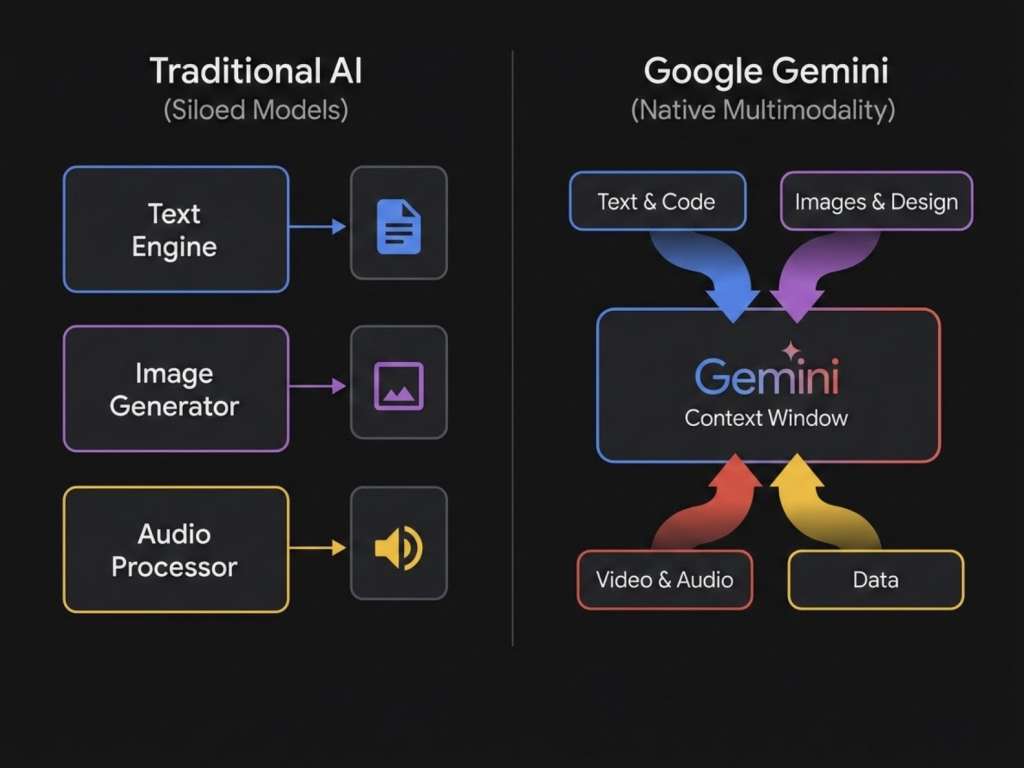
Because of this unified architecture, Gemini treats text, visual pixels, code, and audio signals as interconnected pieces of information within the same context window:
- Text & Code: Analyzes complex logic, refactors large codebases, and writes natural language responses.
- Images & Design: Understands visual layouts, charts, technical diagrams, and generates or edits high-resolution graphics.
- Video & Audio: Processes hours of raw footage or long audio files natively, allowing users to ask questions about specific timestamps or visual details without needing a transcript.
By processing all these formats natively, Gemini offers seamless cross-modal reasoning, allowing you to drop in a diagram, a snippet of code, and a voice prompt, and receive a unified, highly contextual answer.
Google Gemini models list: model families and specialized models
Google DeepMind Gemini models: Pro, Flash, Flash-Lite and Nano
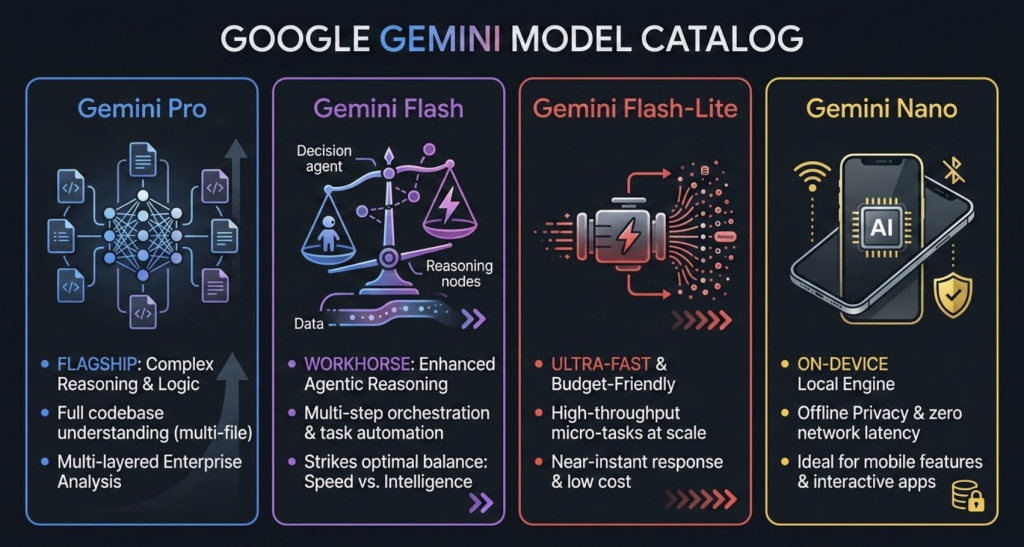
At the core of Google’s AI portfolio are the foundational engines developed by Google DeepMind. Rather than treating AI as a single monolithic engine, Google organizes its foundational capabilities into distinct model families – primarily Pro, Flash, Flash-Lite, and Nano. Each model family defines a specific operational profile balancing reasoning depth, execution speed, compute cost, and memory capacity.
Gemini Pro Family: flagship for complex logic and code analysis
The Gemini Pro family represents Google’s flagship reasoning tier, engineered specifically for high-complexity operations, deep logical reasoning, and multi-file software engineering. When an operational task demands more than quick answers such as evaluating multi-layered legal contracts, architecting enterprise systems, or performing full codebase refactoring – models in the Pro family provide the necessary analytical depth.
Gemini Flash Family: versatile model with enhanced agentic reasoning
The Gemini Flash family serves as Google’s “generalist workhorse” tier, striking an optimal balance between rapid execution speeds and frontier-class reasoning. Designed to eliminate the historical trade-off between intelligence and latency, the Flash family delivers advanced agentic reasoning and multi-step orchestration at low operational costs.
Gemini Flash-Lite Family: ultra-fast and cost-effective model for micro-tasks
The Gemini Flash-Lite family is an ultra-low latency, budget-friendly tier designed specifically for high-throughput micro-tasks. In large-scale digital applications where millions of small operations occur daily, deploying heavy reasoning models can become slow and cost-prohibitive. The Flash-Lite family solves this by delivering near-instant responses at a fraction of the compute cost.
Gemini Nano: on-device AI model for smartphones and offline use
Unlike its cloud-hosted siblings, Gemini Nano is engineered to run directly on end-user hardware, such as smartphones, tablets, and smart devices. By processing data locally on the device (on-edge), Nano eliminates network latency and keeps sensitive user information entirely offline. This makes it the go-to solution for mobile OS features, real-time keyboard suggestions, private message summaries, and app features that must work reliably without an internet connection.
Specialized and agentic Gemini AI models
As AI transitions from simple response generators to active digital assistants, Google has expanded its lineup with purpose-built agentic models. These specialized engines go beyond standard prompt-and-answer interactions by actively navigating software environments, executing complex workflows, and autonomously solving multi-step tasks.
Gemini Deep Research — autonomous agent for deep analysis and web search
Gemini Deep Research is an autonomous, agentic research engine built for comprehensive, multi-source investigation. When faced with complex analytical questions, Gemini Deep Research does not rely on a single web query. Instead, it dynamically formulates a multi-step research plan, queries hundreds of digital sources, evaluates intermediate findings, and compiles fully cited synthesis reports. It handles hours of manual web research in minutes, making it invaluable for market analysis, competitive intelligence, and academic literature reviews. Available embedded inside the Gemini Enterprise web application or programmatically through select developer preview APIs (including variants like Gemini Deep Research Max for maximum comprehensiveness).
Gemini Computer Use — model for visual graphical user interface (GUI) control
Taking automation beyond traditional APIs, Gemini Computer Use allows AI to interact directly with software interfaces just as a human operator would. By interpreting visual screen elements, mouse clicks, and keyboard inputs, this model can navigate complex desktop applications, web portals, and legacy systems without custom API integrations. From filling out multi-page web forms and testing user interfaces to automating cross-platform administrative workflows, it bridges the gap between software platforms that otherwise cannot communicate. Provided as standardized agent pipelines within Google Cloud and accessible through specialized developer APIs.
Creative Gemini models: image, video and voice generation
Beyond analytical logic and text processing, the Gemini ecosystem extends into rich visual and expressive media. Google’s creative engines leverage native multimodality to bridge conversational instructions with real-time image, video, and vocal generation.
Nano Banana: Gemini models for image generation and editing
Nano Banana is Google’s umbrella brand for its native conversational image generation and editing engines. Built upon the intelligence of the Gemini foundation models, Nano Banana introduces features like up to 4K resolution output, search grounding for factual visual correctness, multi-turn sequential canvas editing, and a dedicated “thinking mode” to pre-plan visual compositions before rendering.

To cover a wide spectrum of creative and commercial demands, the Nano Banana family includes three specialized tiers:
- Nano Banana Pro (Gemini Pro Image): the premium, studio-grade visual engine engineered for maximum creative control. It combines a reasoning core with visual synthesis to deliver high-fidelity 4K visuals, precise legible text rendering, complex multi-turn image editing, and character consistency across projects using up to 14 reference inputs.
- Nano Banana (Gemini Flash Image): the main production workhorse of the lineup, designed for high-efficiency visual asset creation at scale. It balances fast generation speeds with rich detailing, supporting multi-image fusion, character consistency, and conversational visual editing.
- Nano Banana Lite (Gemini Flash Lite Image): the efficiency specialist optimized for ultra-low latency and cost-sensitive interactive applications. It provides rapid, scalable image generation and basic editing where speed and volume take precedence over complex multi-turn composition.
Gemini Omni / Gemini Omni Flash — multimodal content and video generation & synthesis
Gemini Omni is an “any-to-any” multimodal model family designed to natively fuse reasoning with creative execution across video, audio, text, and images. Rather than operating as a simple text-to-video generator, Gemini Omni acts as a conversational video creator and editor capable of performing keyframe interpolation, video extension, and dynamic style adjustments directly through multi-turn prompts.
By processing temporal frames natively rather than stitching separate frame generators together, Omni Flash enables rapid video generation, motion editing, and real-time visual-storytelling workflows with remarkably low latency.
Gemini Audio & Live: voice models for real-time conversation and translation
Gemini Audio & Live represents Google’s low-latency speech-to-speech model stack, engineered for natural, real-time voice interactions. Operating directly in the audio domain, these models eliminate intermediate text transcription steps to enable bidirectional streaming, affective voice dialogue, and fine-grained narration control.
Key models in the speech-to-speech lineup include:
- Gemini Live Translate: A specialized, low-latency translation model engineered for real-time speech-to-speech communication across 70+ languages. It enables sub-second voice translation while preserving natural speech pacing and tone.
- Gemini Flash Live: A fast, low-latency conversational voice engine designed for real-time audio dialogue and live streaming applications. It enables conversational agents to respond naturally to spoken interruptions and process live audio inputs with high fidelity.
Gemini in Google Workspace and enterprise apps
Beyond developer APIs and base foundation models, Google embeds Gemini directly into daily productivity software and corporate collaboration portals. This application layer translates raw artificial intelligence into practical user interfaces, allowing everyday business employees, managers, and researchers to automate administrative workflows, query enterprise knowledge bases, and synthesize complex documentation without writing code.
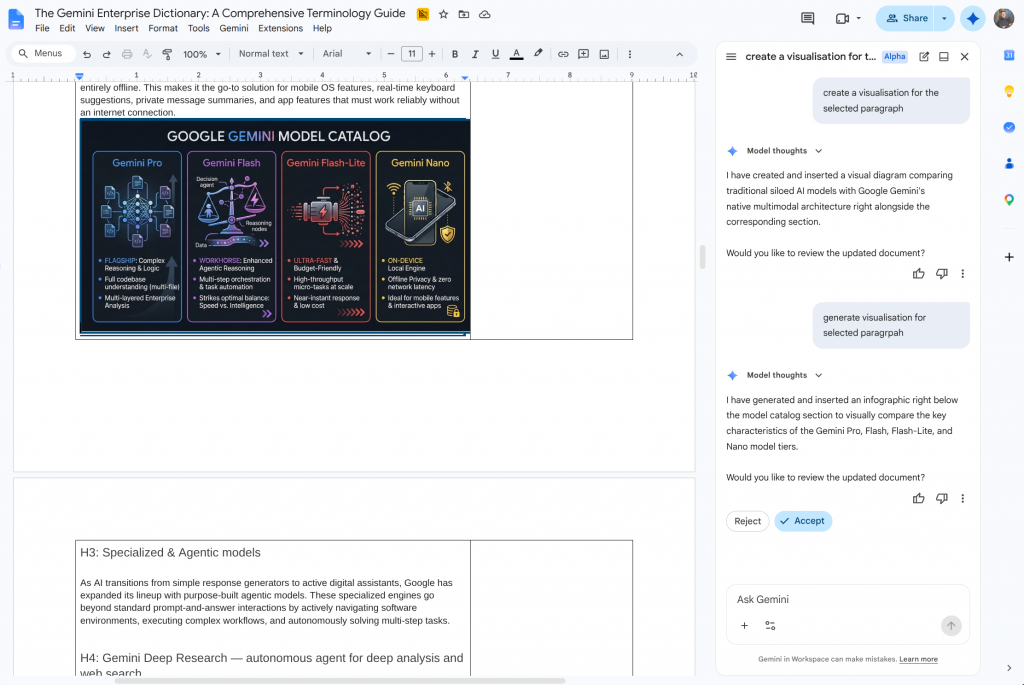
Gemini Assistant in Google Workspace: AI side panel in Gmail, Docs and Sheets
Gemini Assistant in Google Workspace serves as the embedded, conversational assistant panel integrated directly within core Google Workspace apps. By operating alongside active work in Gmail, Google Docs, Sheets, Slides, Drive, and Google Meet, it provides contextual assistance without forcing users to toggle between separate browser tabs.
- Users can generate email drafts in Gmail, produce instant summaries of multi-page Google Docs, create presentation visuals in Slides, or organize unstructured tabular data in Sheets directly from an active tab.
- The panel natively draws context from active documents and files stored across Google Drive, answering questions and executing commands grounded in the user’s immediate work environment.
- Following Google’s packaging restructuring, Ask Gemini is bundled directly into Business Standard, Business Plus, and Enterprise Google Workspace subscription tiers.
Gemini Application in Google Workspace (gemini.google.com)
The standard, standalone web and mobile interface adapted for business users. When logged in with an enterprise account, the Gemini Application gives employees a dedicated chat interface to brainstorm, analyze files, draft long-form content, and execute complex queries. It enforces full enterprise-grade data protection, ensuring that prompt inputs, conversation histories, and uploaded attachments are strictly kept private and never used to train public Google models.
- Natively connects to a user’s Google Workspace environment, allowing employees to query, analyze, and generate content grounded directly in their Google Drive files, Gmail threads, and Google Docs.
- Built with strict corporate data governance, ensuring that user prompts, uploaded files, and generated responses are never used to train public Gemini models.
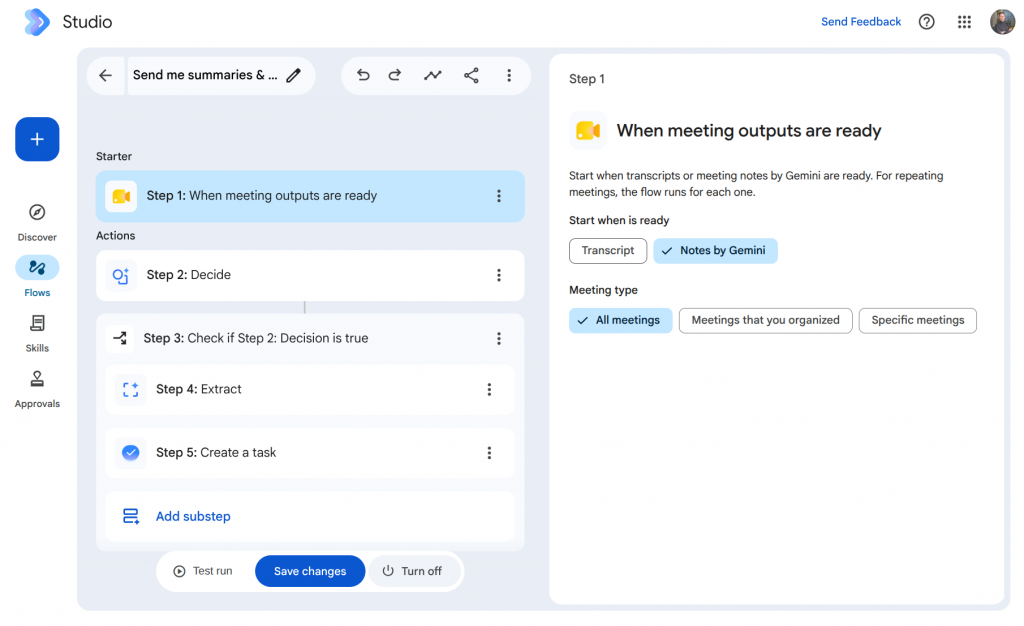
Gemini in Google Workspace Studio — no-code platform for creating trigger-based agents
Gemini in Google Workspace Studio is a native, no-code automation workspace designed for building custom trigger-and-action agents. Instead of relying on complex scripting or third-party integration platforms, non-technical employees can construct automated business logic using plain, natural language prompts.
- Employees can describe routine operational tasks – such as triaging incoming emails, moving data into Google Sheets, and sending automated responses – and Studio constructs the execution logic.
- Frequently used to process customer inquiries in Gmail, extract metrics into structured spreadsheets, and draft personalized follow-up emails automatically.
- Included in base Google Workspace plans with a monthly cap of 2,000 executions, with expanded volume available through the AI Expanded Access workspace add-on.
Gemini Notebook — source research and synthesis module
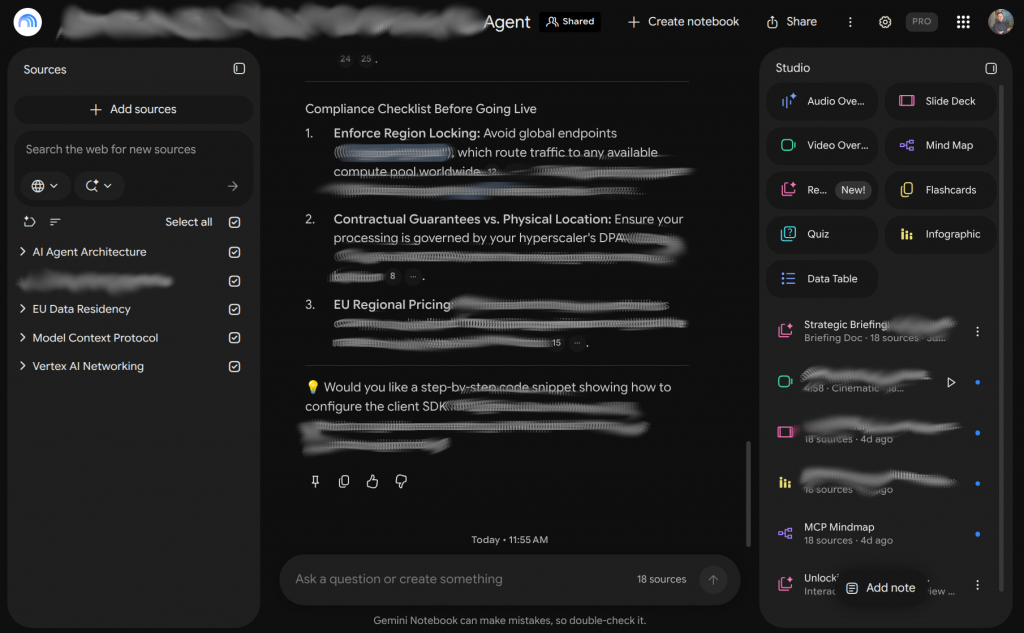
Gemini Notebook is a core research and synthesis module embedded directly within the Gemini Enterprise application (formerly operating as the standalone tool NotebookLM). Engineered as a grounded research workspace, it allows analysts and corporate teams to synthesize private, complex source materials securely without data leakage.
- Users can upload private PDFs, financial spreadsheets, research papers, and audio files to conduct grounded Q&A, construct structured study guides, and extract key takeaways.
- Generates interactive, dual-host conversational Audio Overviews that summarize dense documentation into natural, podcast-style audio discussions.
- Included as a default workspace module within Gemini Enterprise subscriptions, giving corporate teams grounded synthesis tools within their enterprise security perimeter.
Enterprise Platform & Licensing Hubs
While Workspace extensions bring AI into daily office applications, Google’s standalone enterprise platforms provide central administrative management, multi-source data indexing, and standalone agent deployment.
Gemini Enterprise (The App) — Standalone Corporate Platform
Gemini Enterprise (formerly known as Agentspace) serves as the core corporate portal for organization-wide AI deployments. Beyond standard chat capabilities, it acts as a unified knowledge center that indexes vast internal data repositories – including enterprise databases, custom APIs, third-party SaaS platforms, and cloud storage. It enables organizations to build, deploy, and govern internal AI agents that answer complex business questions grounded directly in proprietary corporate data under strict access controls.
- Hosted on cloud.google.com/gemini-enterprise, it operates as an independent central portal running securely on Google Cloud infrastructure without requiring a Google Workspace subscription.
- Connects securely across Google Workspace, Microsoft 365, SAP, ServiceNow, Jira, Confluence, Salesforce, and Asana, enabling cross-system knowledge discovery under a single interface.
Gemini Enterprise – Business Edition
Gemini Business is a specialized licensing tier under the broader Gemini Enterprise umbrella designed to make generative AI accessible across whole organizations without requiring full cloud architecture management. It can be provisioned in two distinct ways depending on your company’s existing IT infrastructure:
- Via Google Workspace: Enabled as an add-on license for organizations already operating within the Google Workspace environment.
- Via Google Cloud Platform (GCP): Provisioned directly through Google Cloud for enterprise customers who do not use Google Workspace as their primary email/productivity suite, allowing stand-alone access to enterprise-grade Gemini applications and governance tools.
Cloud operations, DevOps & developer assistants
To support IT operations, software engineering, and cloud management, Google embeds specialized AI assistants directly across the Google Cloud ecosystem. These domain-tailored tools assist developers, database administrators, security analysts, and DevOps engineers by translating complex technical operations into intuitive, conversational workflows. By integrating directly into Integrated Development Environments (IDEs), cloud management consoles, and security operations platforms, these assistants streamline technical operations while maintaining enterprise-grade governance.
Gemini Code Assist — developer assistant with full codebase understanding
Gemini Code Assist is an enterprise-grade coding assistant integrated directly into popular IDEs such as VS Code, JetBrains, and Cloud Workstations. Designed to accelerate software development, it autocompletes code blocks, refactors legacy codebases, performs automated reviews, and generates comprehensive unit tests.
- Powered by a massive 1-million-token context window, Gemini Code Assist maps local project repositories to understand dependencies, architecture, and context across multiple files simultaneously.
- Automatically screens generated code against open-source repositories, flagging copied code blocks and providing exact license citations to preserve compliance.
- Purchased as flat-rate Standard or Enterprise seat licenses managed directly through the Google Cloud Admin Console.
Gemini Cloud Assist — cloud infrastructure management and optimization
Gemini Cloud Assist is an operational assistant embedded directly inside the Google Cloud Console and command-line interfaces. It aids DevOps operators and Site Reliability Engineers (SREs) in designing, troubleshooting, and optimizing complex cloud environments.
- Design: Converts natural language prompts into visual architecture diagrams and ready-to-deploy Terraform manifests.
- Troubleshoot: Automatically analyzes system logs, traces error cascades, and packages diagnostic context for support teams.
- Optimize: Pinpoints idle Google Kubernetes Engine (GKE) clusters, identifies sudden billing spikes, and provides actionable right-sizing recommendations.
- Pricing: Offered as a free public preview tier prior to its transition to consumption-based billing upon general availability.
*Note: Google stated that the Gemini CLI and Gemini Code Assist IDE extensions stop serving requests on June 18, 2026 for Pro, Ultra, and free-tier users, as those tools fold into Antigravity.
Gemini in Security — threat detection via SecLM API and Model Armor
Gemini in Security is a threat detection, investigation, and response assistant powered by the security-tuned SecLM API. Natively embedded inside Google Cloud Chronicle and Security Command Center, it synthesizes complex security telemetry to accelerate incident response.
- Summarizes security alerts, analyzes vulnerabilities within Security Command Center, and drafts automated threat mitigation scripts.
- Working alongside the Agent Gateway network layer, Model Armor acts as an active security filter that blocks prompt injection attacks, enforces Data Loss Prevention (DLP) policies, and verifies output compliance.
Gemini in Databases — automated database administration and SQL generation
Gemini in Databases acts as an AI collaborator accessible through the Google Cloud Database Center dashboard. It simplifies database administration and query optimization across Cloud Spanner, Cloud SQL, and Database Migration Service.
- Translates plain-language user requests into optimized SQL queries.
- Analyzes system metrics to diagnose slow-running queries and delivers intelligent indexing and schema advice.
Gemini in BigQuery and Looker — conversational analytics and reporting
Gemini in BigQuery and Looker provides a conversational analytics layer over enterprise data warehouses and business intelligence tools. It enables both data engineers and non-technical business users to extract insights without deep technical overhead.
- BigQuery Data Canvas: A visual workspace within the BigQuery Console where analysts can visually join tables, auto-write SQL, and document schema metadata conversationally.
- Looker Conversational Reporting: Allows business stakeholders to ask natural-language questions directly against corporate data metrics, automatically generating structured reports and visual charts.
Gemini Enterprise Agent Platform — backend command center for AI agent deployment
The Gemini Enterprise Agent Platform evolved from the Vertex AI developer suite. It functions as the backend MLOps and infrastructure command center for building, hosting, and governing custom enterprise AI agent fleets.
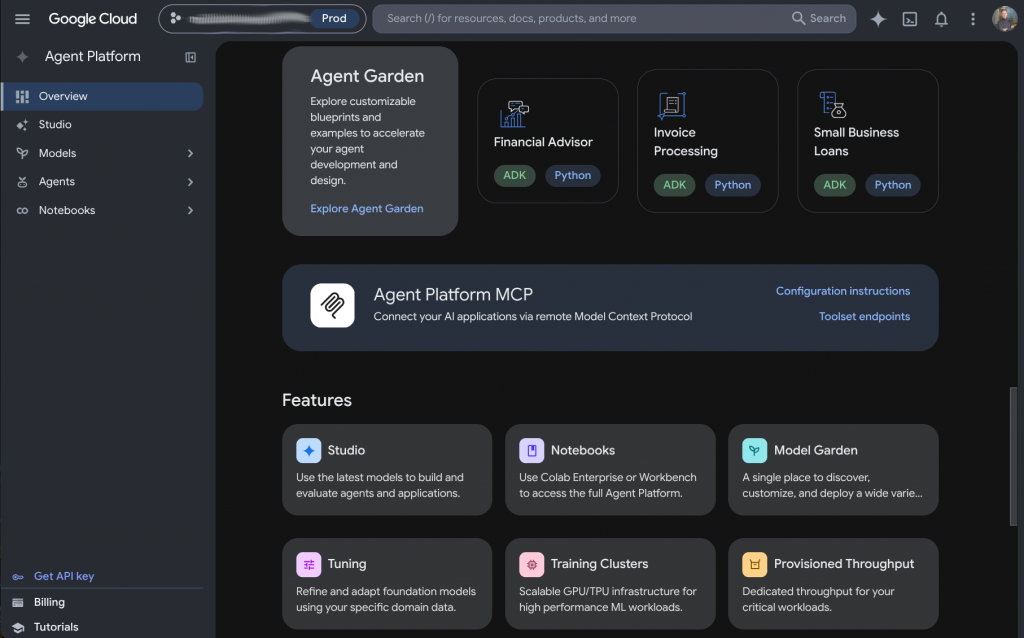
- Core MLOps infrastructure: Houses foundational models, code runtime execution environments, and centralized data security perimeters, billed on a pure consumption basis (metered API tokens, compute memory, and storage).
- Agent studio & Agent Development Kit (ADK): Features low-code visual playgrounds (Agent Studio) for testing prompts and model-agnostic SDKs (ADK) for building complex reasoning loops.
- Runtime & memory bank: Delivers sub-second execution hosting (Agent Runtime) alongside long-term state persistence engines (Memory Bank) for maintaining context across sessions.
- Agent gateway & identity: Enforces cryptographically secure GCP Service Account identities (Agent Identity) and central network access boundaries.
How much does Gemini cost: free tier, subscriptions and API pricing
Understanding the pricing structure of the Google Gemini ecosystem requires examining how Google packages its models across different user segments. Because Gemini spans consumer web interfaces, individual productivity subscriptions, corporate SaaS portals, and cloud developer infrastructure, pricing models range from free entry-level tiers to seat-based enterprise licenses and consumption-metered API billing.
Free tier and its limitations
For individuals and developers getting started, Google provides zero-cost entry points across both consumer applications and developer environments.
- Consumer web & mobile access: Everyday users can access baseline Gemini conversational capabilities for free via the web app and mobile interfaces, providing routine text drafting, Q&A, and basic multimodal assistance without requiring a paid subscription.
- Google AI studio free tier: Developers and engineers can experiment with Gemini foundation models at no cost through Google AI Studio, making it ideal for prototyping, testing prompts, and building lightweight applications.
- Operational limitations: Free tiers come with predefined usage caps. Developer free APIs enforce rate limits on requests per minute (RPM) and tokens per minute (TPM), while consumer free tiers may limit access to frontier reasoning models during peak traffic, constrain context window sizes, or limit high-volume media generation.
Google AI Plus, Pro and Ultra (formerly Gemini Advanced) for individual users
For power users, freelancers, and professionals needing frontier-class reasoning, Google offers the Gemini Advanced subscription as part of the Google One AI Premium plan.
- Gemini Advanced grants subscribers priority access to Google’s most capable reasoning engines (such as the flagship Gemini Pro series) alongside expanded context processing limits.
- The subscription embeds AI tools directly across consumer Google Workspace applications including Gmail, Google Docs, Slides, and Sheets for seamless document drafting, email summarization, and slide creation.
- Packaged under the Google One AI Premium tier, the subscription combines premier AI capabilities with expanded Google Drive cloud storage (typically 2 TB) under a single monthly fee for individual accounts.
Enterprise solutions: Gemini Enterprise and API
For organizations requiring enterprise-grade security, team collaboration, and API integration, Google provides two main deployment avenues:
Gemini Enterprise (App) licensing tiers
Gemini Enterprise (The App) is a standalone corporate application built to index, search, and secure multi-vendor enterprise data systems under a single interface. To support different deployment scales across corporate workforces, Google offers five distinct seat licensing editions:
- Business Tier ($21/mo per user): Designed for growing organizations needing core enterprise search, cross-system data indexing, and workspace conversational assistance.
- Standard Tier ($30/mo per user): Tailored for corporate knowledge workers requiring deeper integration across multi-vendor business platforms.
- Plus Tier (from $30/mo per user): Built for power users, strategy teams, and analysts who require heavy document synthesis, grounded research tools (including Gemini Notebook), and multi-step agent execution.
- Frontline Tier ($12.50 floor per user): An economical tier optimized for field, operational, and frontline employees needing lightweight query access to corporate knowledge bases (requires a minimum of 150 licenses of Standard or Plus in the same subscription; full details are available in the Google Cloud documentation).
- Pay-as-you-go Tier ($0 base seat fee): Features no upfront seat cost, allowing enterprises to distribute access broadly while paying only for active user engagement and compute usage.
Dual-Billing system and developer API pricing
Managing corporate AI budgets requires understanding how seat licenses interact with underlying cloud infrastructure costs.
The Dual-Billing architecture
For enterprise portals like Gemini Enterprise (The App), cost management is split across two distinct billing components:
- Per-Seat Licensing (Fixed Base Access): Covers user access, web portal hosting, user interface features, and standard conversational interactions on a fixed monthly subscription basis per assigned user.
- Pay-As-You-Go Consumption (Variable Overage): Applies when employees execute high-volume, autonomous multi-step agent actions or complex cross-system queries. These usage-based overage charges are metered and billed directly through the organization’s linked Google Cloud Billing account under the Vertex AI Search SKU.
Developer API consumption pricing
For custom software engineering on the Gemini Enterprise Agent Platform (formerly Vertex AI), usage is billed purely on a consumption basis. Costs are calculated from metered API tokens (input and output tokens processed), active memory hosting, and runtime storage. Developers can choose between flexible PayGo (pay-as-you-go) consumption or Provisioned Throughput reservations to secure guaranteed capacity for high-throughput enterprise applications.
Conclusion: how to choose the right Gemini model without overspending
The Google Gemini ecosystem marks a pivotal shift from standalone conversational chatbots to a unified, enterprise-grade AI infrastructure. However, realizing its true value depends on your ability to match the right tool to the right workload. By categorizing its offerings across distinct foundational engines (from lightweight Flash-Lite to heavy-reasoning Pro models), specialized agents, and tailored licensing tiers, Google provides an option for virtually every compute and budget requirement.
Ultimately, cutting through the complex naming architecture allows business leaders and IT teams to eliminate costly over-provisioning. Whether you are looking to streamline daily business tasks, build complex software, or deploy custom autonomous workflows, Gemini provides the scalability, security, and precision required for modern digital transformation. Applications like Gemini Enterprise streamline daily productivity, while platforms like the Gemini Enterprise Agent Platform deliver secure MLOps for autonomous agent fleets. Strategic adoption of this ecosystem enables organizations to move beyond basic automation, unlocking peak operational efficiency and measurable cost optimization.